

Tag line Written Here
Created On: 20/20/2021
First Update: 20/20/2021
Developed By: Csoft Systems
Email: csoftsystems.com
Thank you for purchasing Real Estate Website HTML Template. If you have any query related to this website theme, please feel free to email, via my user page contact form or put a message at Support Center .
Thank you so much for purchasing theme!

The html template uses Latest Bootstrap v4.4.1 with valid HTML5 tags. This theme is a responisve layout with 4 column Support layout. All of the information in content area is nested within a class and comes with already classes.
    <!-- Section 3 Start Here -->
        <section class="container">
            <div class="z-depth-3 mainsection">
                <div class="z-depth-3 headingdiv" >
                    <img src="asset/icons/css.svg" alt="Html Icon">
                    <h4> class="heading">CSS Files & Structure</h4>
                </div>

                <div class="container-fluid section">
                    <p>Mainly four main CSS files are used in this theme. The first one <span>, class="bold">bootstrap.
                        min.css</span>, second one is <span> class="bold">style.css</span> third one is
                        <span> class="bold">bootsnav.css</span> which for this template and forth one is responsive.css
                        to control responsive layouts.</p>

                    <p> class="my-3">If you would like to edit a specific section of the site, simply find the
                        appropriate label in the CSS file, and then scroll down until you find the appropriate style
                        that needs to be edited.</p>

                </div>
            </div>
        </section>
    <!-- Section 3 End Here -->

Mainly four main CSS files are used in this website theme. The first one bootstrap.min.css, second one is style.css third one is bootsnav.css which for this template and forth one is responsive.css to control responsive layouts.
If you would like to edit content in the website theme, simply find the rellated class name of tag or section in the CSS file, and then scroll down until you find the style that needs to be changed.
This website uses Two types of Javascript files.
jQuery is a Javascript library that greatly reduces the amount of code that you must write.
Most of the animation in this site is carried out from the customs scripts. There are a few methods to looking at them.
In addition to the custom scripts, I have implemented few "tried and true" plugins to create the effects in the website. These plugin is packed, so you don't need to manually edit or change anything in the files. The only necessary thing to know is how to call the function

From today & in future, If you want to use google maps, Google map API key is mendatory. For this reason below is a detailed method how to generate google api key and where to use in the template.
Without Api Key map will not display.
Google Map API key dashboard seen like this.
You will need to add all those pages on which you want to display Google Map, with respect to your website / domain.
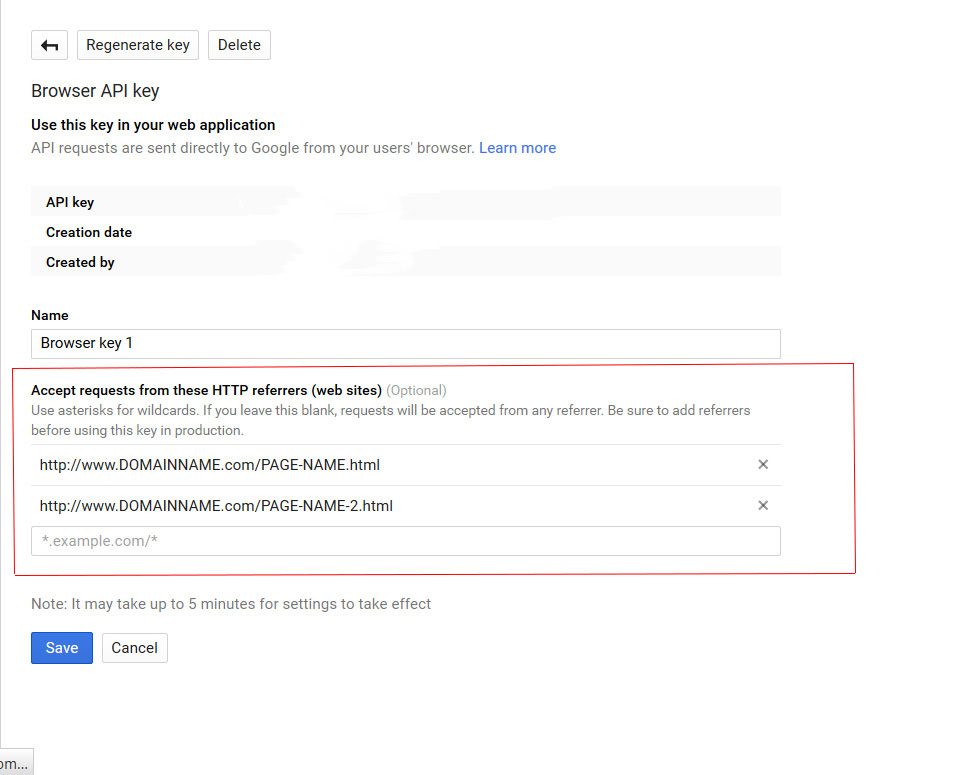
After Generating API KEY look like this.
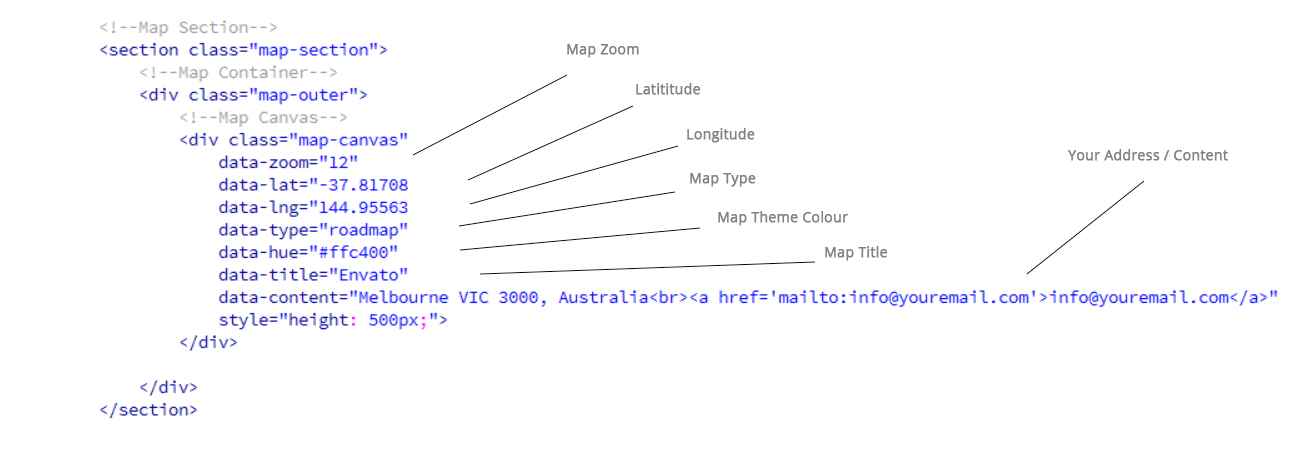
You will find given code at the end of the file on which map is displayed.

Adding Your Information.
You have to change Required / Needed Values in Map Container Of the Page. You can also change icon of the marker in the file named map-script.js inside js folder
Edit The Attribute values of DIV class named MAP CANVAS inside Map Container with your credentials.
As Below

We have added an responsive and eye catching contact form. You need to update the name and email address.
You can edit name and email address in sendemail.php


Fonts Used int the website theme are from google fonts, you can find fonts on Google Fonts API
Fonts Used are :
File Used For Animation Effects :
Sliders Used Are :
Icons Used are :
Used Elegant icon pack is attached as a zip with Documentation.
Used Elegant icon pack is attached as a zip with Documentation.
From Flaticon, Icons are custom selected and downloaded as a font. If you need to use more icons or want to add or change icons, you need to select icons of your desire from flaticon.com as font files and replace with the already used files.
(Previous Flaticon icons will be removed when you will use your own selected/downloaded Flaticons font)

Once again, thank you so much for buying this theme. As I said at the start, I feel pleasure to assist you if you have any query relating to this theme. No guarantees, but I do my best to assist you. If you have any queries, please feel free to contact us at Support Center.
Email Us: support@csoftsystems.com